Posts

Showing posts with the label Logged In User

Show user login details in a quickest and more flexible way

Image
You all might be aware of the CRM inbuilt  User Audit Access functionality , which shows user login access. I also proposed the same solution to my client, when he asked me about how to check user login date and time in CRM. But, he wanted a user-friendly and flexible way to access this data.  Problem with current inbuilt functionality :      1. Accessing Data                   To access the user login audit data, as a user I have to perform several steps. which is not the quickest or most convenient way. i.e.   Go to Advanced Settings >> Auditing >> Audit Summary View >> Filter Event Column with "User Access via Web".      2. No filter on User Record                     It shows the login data for all users. The filter is not available for the user record, which makes it hard ...
Efficient way to check Logged In user's security role

Image
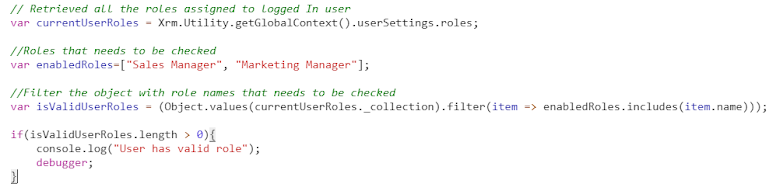
As a CRM developer, we all have developed functionality to check logged-in user's security roles. We used to get GUID of security role and then we have to fire a query to the server-side to get the role names. Thankfully Microsoft has slipped in an update to get the role names. Xrm.Utility.getGlobalContext().userSettings  has been updated with a new function called roles ,   which returns a collection of lookup objects containing the GUID and display name of each of the security roles assigned to the user and any security roles assigned to the team that the user is associated with. Let's take look at this with a scenario: I have to perform some functionality if the current user has  Sales Manager or Marketing Manager  role assigned to him. And here is the result: currentUserRoles object contains all the roles assigned to the logged In user and isValidUserRoles contains the result after filtering the currentUserRoles object with required roles. Click here for...